How Ticket Scalping Bots Work: Technical Architecture and Detection
You want to understand how ticket scalping bots work, but most explanations oversimplify the topic and describe them as nothing more than fast scripts clicking through ticket websites. In reality, ticket automation is far more complex and involves browser orchestration, queue systems, session management, fingerprinting, and anti-detection measures.
Imagine being able to understand exactly why ticketing platforms are so difficult to automate, why queue systems are heavily defended, and why modern ticket bots are closer to distributed infrastructure systems than simple scripts. That is not just possible, it becomes much easier once you break the architecture into its core components.
This guide explains how ticket scalping bots work, what technical systems they rely on, how ticketing platforms detect them, and what architectural patterns appear across other high-demand industries as well.

Why Ticket Scalping Bot Architecture Matters
Ticket scalping bot architecture matters because ticketing platforms represent one of the most competitive and adversarial environments in consumer web infrastructure. High-demand events create predictable release times, fixed inventory, and sudden traffic spikes that place enormous pressure on ticketing systems.
Ticket scalping bot automation is becoming more important to understand because ticketing companies continue to invest heavily in queue systems, anti-bot defenses, and identity verification. Developers, security teams, QA engineers, and infrastructure specialists who understand how these systems work gain a better understanding of how modern automation and mitigation systems evolve.
The opportunity is not limited to ticketing alone. The same principles apply to flash-sale ecommerce, sneaker drops, limited product launches, reservations, and NFT mints, where the combination of scarcity and competition creates similar automation challenges.
1. Who This Use Case is For
This topic is especially useful for developers building browser automation systems because it shows how client-side rendering, token binding, and queue logic affect workflow reliability.
It is also valuable for security teams and fraud analysts who want to understand how modern ticketing systems detect suspicious behavior through browser fingerprints, network patterns, and behavioral modeling.
Product teams, QA engineers, and infrastructure architects can also benefit because ticketing environments reveal how platforms protect scarce resources while trying to preserve user experience for legitimate customers.
2. What You'll Achieve
By understanding ticket bot architecture, you will be able to recognize the core layers of ticketing automation, identify where most detection systems focus their defenses, understand why session integrity matters more than raw speed, and apply these lessons to other high-demand industries.
In real-world environments, these insights help developers build more reliable testing systems, help security teams identify suspicious traffic patterns earlier, and help infrastructure teams design better queue systems that preserve fairness during traffic surges.
3. What You'll Need
Before understanding ticket scalping bot systems in depth, it helps to understand the technologies and infrastructure that modern browser automation relies on.
Technical Requirements
For browser-based automation, most systems rely on tools such as Puppeteer, Playwright, or Selenium because ticketing workflows are highly dependent on JavaScript rendering, session persistence, and dynamic client-side behavior.
These systems also often require stable browser environments, cookie persistence, token storage, and in some cases proxy management to preserve session continuity.
For mobile automation, Android devices or Android emulators may be required when ticketing platforms provide native mobile apps with different workflows than their browser interfaces.
Platforms such as Appilot can become relevant in these cases because Appilot supports both browser automation and real Android device execution from a single dashboard. This can simplify testing workflows when teams need both browser and mobile coverage. Appilot uses Android Accessibility Services and real-device execution rather than relying only on desktop browser environments.
Skills and Knowledge
A technical understanding of browser automation, JavaScript rendering, session handling, and queue systems is helpful when working with ticketing workflows.
Developers may also benefit from familiarity with browser fingerprints, HTTP requests, cookies, local storage, and token management because all of these play a role in modern ticketing systems.
For less technical teams, visual automation platforms can make it easier to understand browser and mobile workflows without requiring direct code implementation.
Time and Resource Investment
Initial setup for understanding or testing ticket automation systems can take anywhere from a few hours to several days depending on the complexity of the workflow and the number of browser sessions being managed.
Ongoing maintenance is also important because ticketing platforms frequently change queue logic, anti-bot systems, and front-end rendering patterns.
Resource costs may include browser automation tools, proxy infrastructure, cloud servers, Android devices, and monitoring tools for larger-scale testing environments.
Appilot Integration Method #1 - The Complete Solution Approach
Implementing Ticketing Workflow Analysis with Automation Platforms
There are generally two ways to work with ticketing workflows. One option is to build everything manually with separate tools such as Puppeteer, Selenium, Playwright, proxy managers, and device farms. The second option is to use an integrated platform that supports browser and mobile automation together.
The DIY approach provides full flexibility because teams can customize every part of the browser environment, proxy stack, session lifecycle, and queue handling system. However, it also creates significant operational complexity because every browser profile, mobile device, cookie store, and workflow needs to be managed separately.
This is where Appilot becomes relevant. Appilot supports Selenium, Playwright, and Puppeteer for browser automation while also supporting Android devices for mobile workflows. For teams testing both ticket websites and ticketing mobile apps, Appilot provides a unified environment for browser sessions, Android device management, scheduling, and monitoring.
This matters because many ticketing systems now operate across both web and mobile environments. Some queue systems behave differently inside mobile apps, while others expose slightly different workflows across platforms.
Appilot can help teams manage browser automation, mobile execution, device fleets, proxy rotation, and session isolation from one interface instead of juggling multiple tools separately.
The trade-off is that integrated platforms are generally easier to manage but offer less low-level customization than a completely custom browser stack.
Step-by-Step Implementation Guide
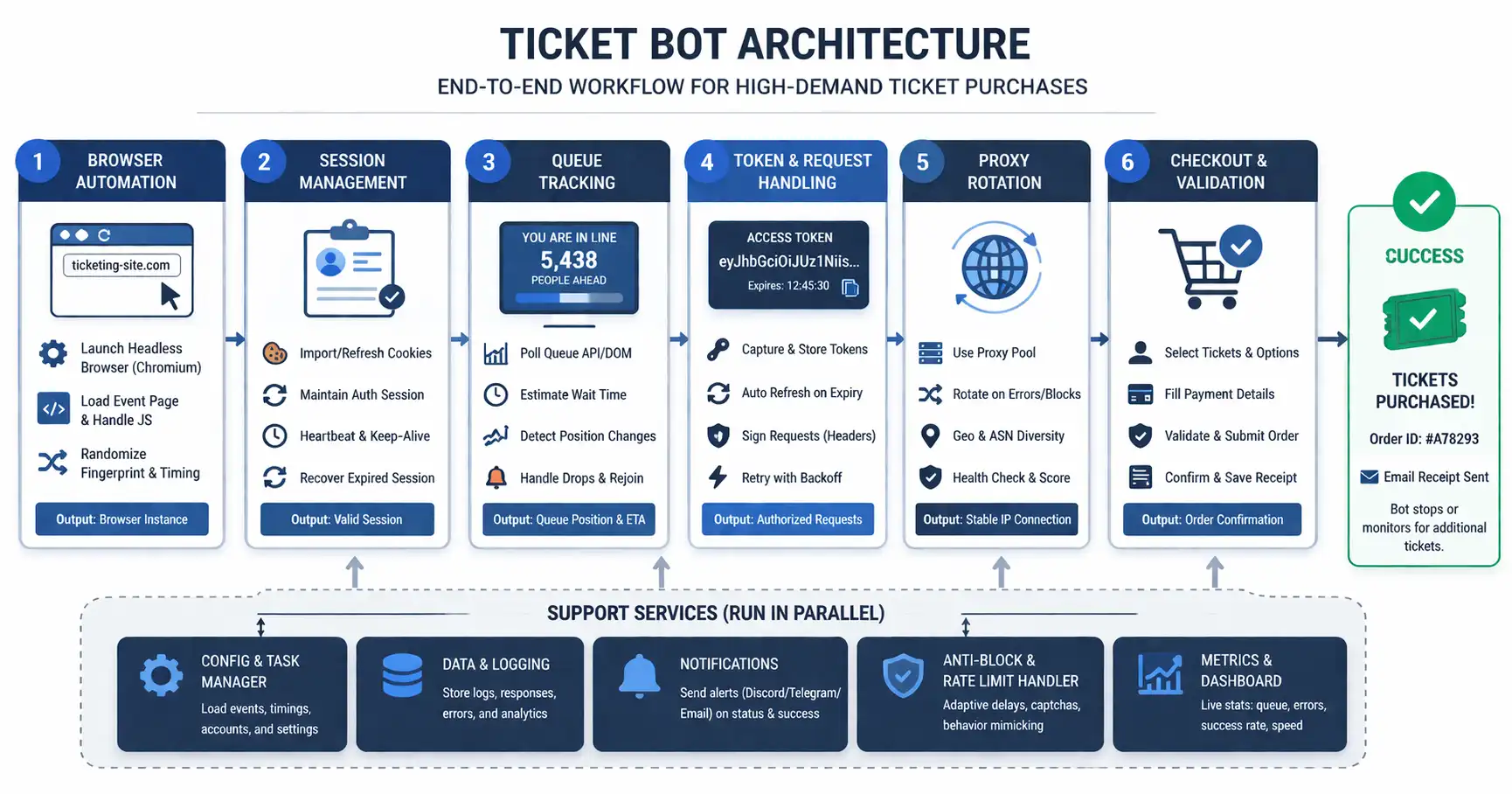
Understanding ticket bot architecture becomes easier when you break the workflow into stages.
Step 1: Understand the Control Plane
The first step is understanding the orchestration layer. Ticket bots rely on a control plane that manages timing windows, session units, retry policies, and queue tracking.
This orchestration layer separates a basic script from a larger distributed automation system because it controls how multiple sessions operate together rather than independently.
A common mistake is assuming that faster execution alone determines success. In reality, poor coordination between sessions often causes more failures than slow execution.
Step 2: Analyze the Execution Layer
The next step is understanding why browser execution matters. Ticketing systems rely heavily on JavaScript rendering, session-bound tokens, and dynamic interfaces.
Because of this, realistic interaction often requires full browser execution rather than simple HTTP requests. Puppeteer, Selenium, and Playwright are commonly used because they allow workflows to behave more like normal browser sessions.
For mobile environments, some workflows may also require Android device automation if mobile apps provide unique access paths or queue behavior.
const puppeteer = require('puppeteer');
async function launchTicketBrowser() {

  const browser = await puppeteer.launch({

    headless: false

  });
  const page = await browser.newPage();

  await page.goto('https://example-ticket-site.com');
  return { browser, page };

}
This type of setup creates a browser environment capable of executing JavaScript and preserving session state across steps.
Step 3: Focus on Session Continuity
Session continuity is one of the most important parts of ticketing automation. Cookies, queue tokens, local storage, and browser state all need to remain consistent.
Many ticketing systems invalidate workflows when sessions reset, when queue tokens move between devices, or when browser state changes unexpectedly.
This is why stable browser profiles and persistent sessions are often more important than raw request speed.
Step 4: Understand Detection Systems
Detection systems rely on multiple layers of correlation. They monitor timing patterns, browser fingerprints, retry frequency, session similarity, and network behavior.
They also focus heavily on queue integrity because queue tokens, checkout sessions, and payment flows represent the most valuable parts of the workflow.
As ticketing platforms mature, they become less dependent on single indicators and more dependent on long-term signal correlation.
Step 5: Monitor and Maintain the Workflow
Ticketing systems change frequently. Queue logic, browser rendering, fingerprinting methods, and session requirements evolve over time.
Teams need to monitor workflows continuously, track failure points, and identify whether issues are caused by browser rendering, queue invalidation, proxy quality, or session instability.
Long-term maintenance is essential because even stable workflows can degrade as ticketing platforms update their defenses.
Appilot Integration Method #2 - Handling Multi-Session Isolation
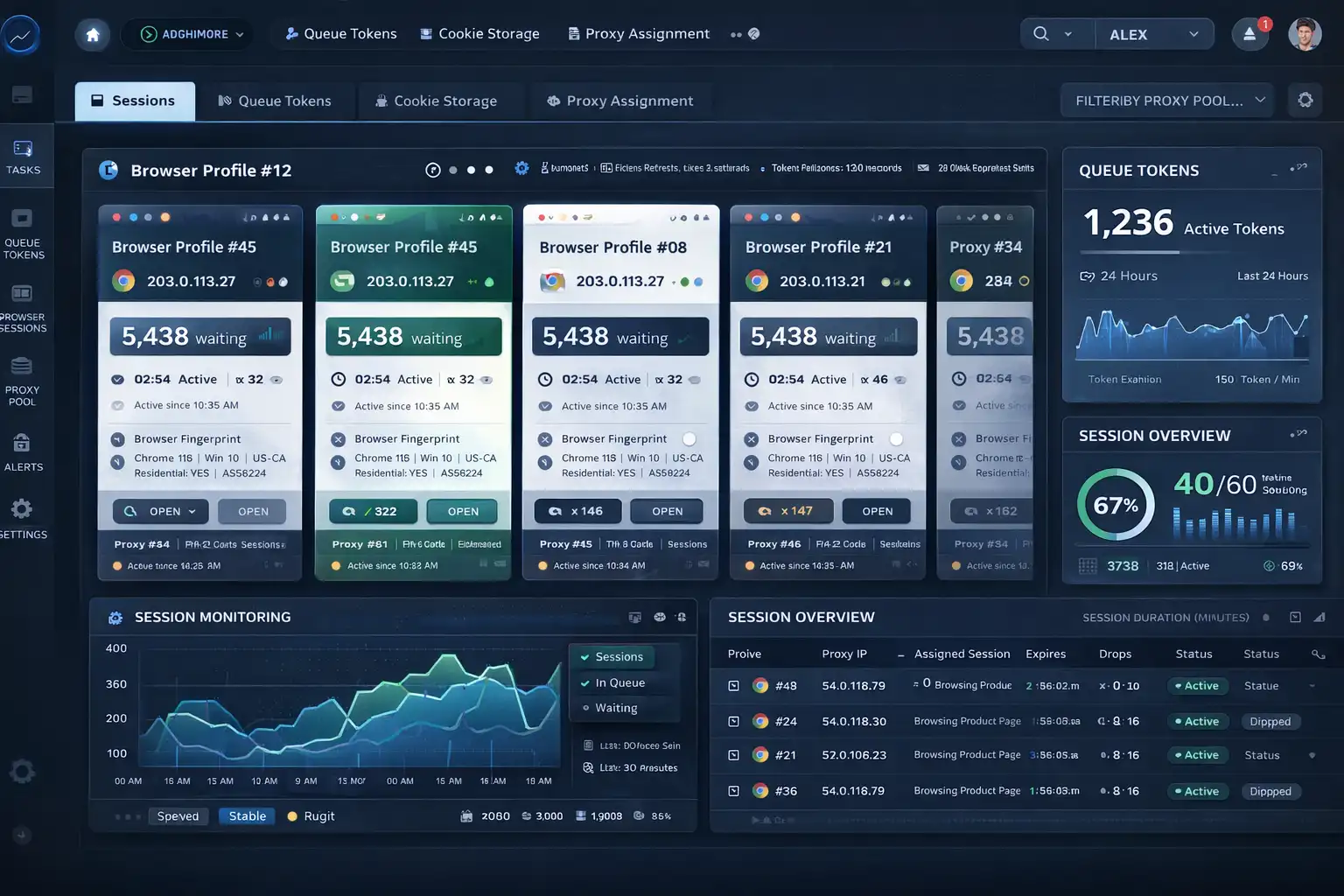
One of the biggest challenges in ticketing workflows is managing multiple browser sessions without creating obvious patterns that detection systems can correlate.
The technical problem is that ticketing platforms often track browser fingerprints, cookies, session continuity, and IP patterns across multiple sessions. When too many sessions share similar characteristics, they become easier to flag.
Traditional approaches usually require developers to manage browser fingerprints, proxies, isolated cookie stores, and device profiles manually.
Appilot addresses this challenge by combining browser profile isolation with Android device-level separation. Browser-based workflows can run in isolated profiles with unique fingerprints, while mobile workflows can run on separate Android devices with independent hardware signals and IP addresses.
This reduces the risk of browser sessions appearing identical and helps maintain better separation across workflows.
Common Challenges and Solutions
Even well-designed ticketing systems face recurring technical problems.
Challenge 1: Queue Token Invalidations
Queue tokens often expire or become invalid when browser sessions reset unexpectedly or when tokens move between environments.
This happens because ticketing systems bind queue access to specific browser sessions and expect continuity throughout the workflow.
The best solution is to preserve session state carefully, maintain cookie continuity, and avoid unnecessary browser restarts.
Challenge 2: Browser Fingerprinting
Browser fingerprints are often used to identify suspicious browser environments through rendering characteristics, navigator properties, plugins, and environment stability.
The best solution is to avoid obvious inconsistencies and maintain realistic browser environments with stable configurations.
Challenge 3: Excessive Session Correlation
Large numbers of identical sessions often become easy to detect because their timing, IP patterns, and browser characteristics look too similar.
Appilot can help reduce this problem by isolating browser profiles, rotating proxies, and distributing workflows across multiple Android devices when needed.
Scaling Ticket Scalping Workflow Analysis
Once teams understand ticketing workflows at a small scale, the next challenge is scaling.
From 10 to 100 Sessions
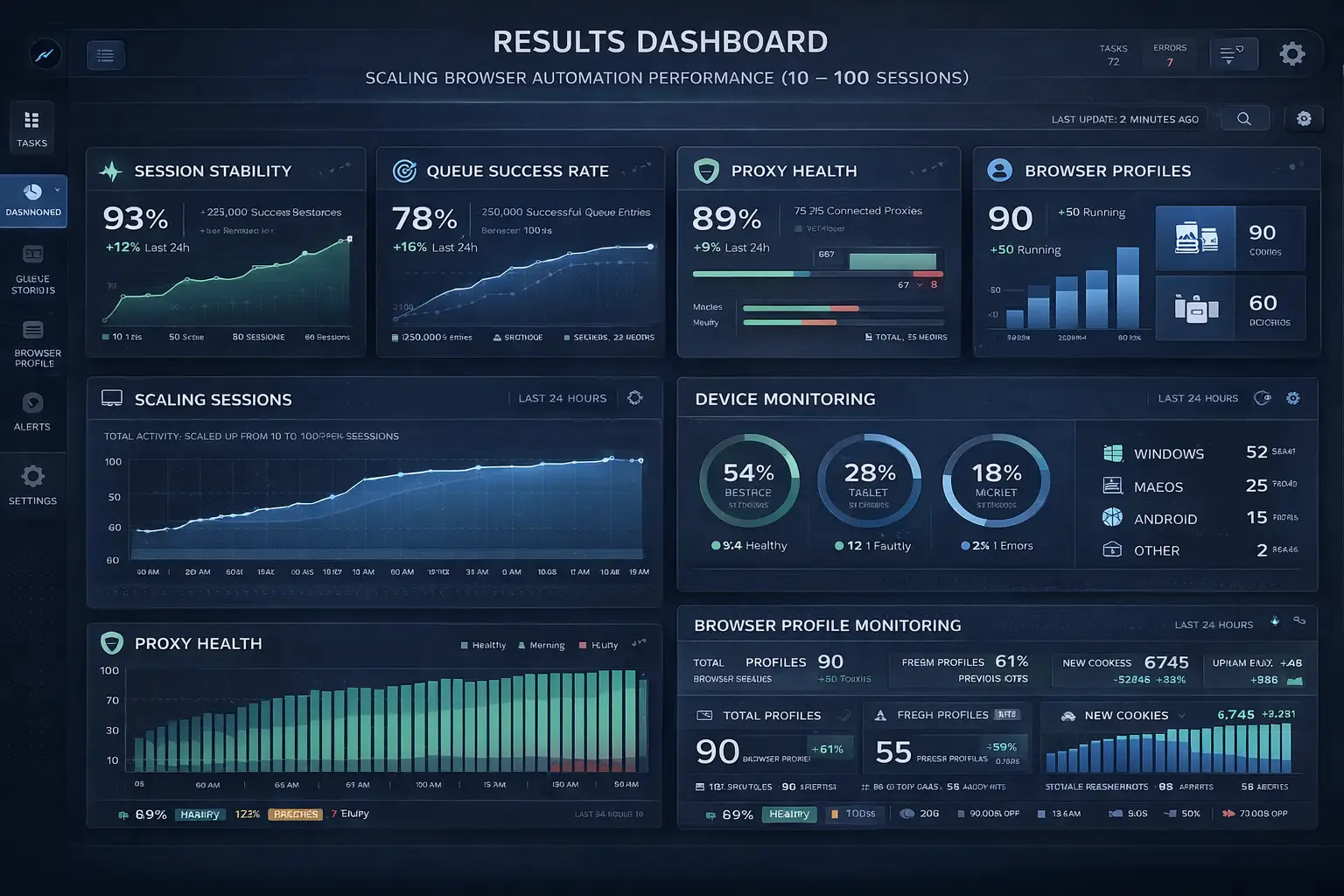
At small scale, teams may only need a few browser profiles and limited monitoring. At larger scale, they often require centralized orchestration, automated monitoring, proxy rotation, device management, and detailed reporting.
The operational complexity increases quickly because every new browser session adds more cookies, tokens, browser states, and queue logic that must be managed.
Platforms such as Appilot can simplify scaling because they provide centralized dashboards for browser profiles, Android devices, scheduling, and monitoring.
Automation and Optimization at Scale
At scale, teams should automate browser profile creation, session monitoring, proxy assignment, and health alerts.
However, strategic decisions such as queue logic adjustments, detection analysis, and workflow redesign should still remain manual because they require human judgment.
Best Practices and Pro Tips
Best Practice 1 - Prioritize Session Stability
Session continuity is more important than raw speed because ticketing systems rely heavily on cookies, tokens, and browser state.
Teams that preserve stable browser environments often experience fewer invalidations than teams that constantly restart sessions.
Best Practice 2 - Reduce Behavioral Uniformity
Uniform timing, synchronized requests, and identical navigation patterns make sessions easier to correlate.
Introducing more natural variation in timing and navigation can reduce the chance of large groups of sessions appearing identical.
Best Practice 3 - Monitor Detection Signals
Challenge pages, queue failures, retry spikes, and invalid sessions are often early indicators that ticketing defenses are reacting.
Tracking these signals helps teams identify problems before workflows fail completely.
Tools and Resources
Browser Automation Tools
Puppeteer is commonly used for Chrome-based browser automation because it provides strong control over rendering and session management.
Playwright supports multiple browsers and is often preferred when workflows need Chrome, Firefox, and Edge support.
Selenium remains one of the most mature browser automation frameworks and has strong support across multiple programming languages.
Appilot can also be useful because it combines browser automation support with mobile automation support inside one platform.
Mobile Automation Tools
Appium is one of the most widely used mobile automation frameworks and supports both Android and iOS testing.
UI Automator provides a native Android approach for mobile automation workflows.
Appilot is relevant for teams that want real Android device execution, Accessibility Services, and remote device management without building separate device infrastructure.
Supporting Tools
Teams may also use proxy providers, database systems, monitoring tools, and analytics platforms to manage larger ticketing workflows.
Frequently Asked Questions
Q1: How long does it take to understand ticket bot architecture?
Most developers can understand the fundamentals within a few hours, but deeper knowledge of browser fingerprints, queue systems, and detection models may take much longer.
Q2: Do I need coding knowledge for ticket workflow analysis?
Basic knowledge of browser automation, JavaScript, and session handling is useful, although some visual platforms make the concepts easier to understand.
Q3: What is the difference between browser automation and mobile automation?
Browser automation focuses on websites running in desktop browsers, while mobile automation focuses on native mobile apps running on Android or iOS devices.
Q4: Can Appilot handle both browser and mobile automation?
Yes. Appilot supports Selenium, Playwright, and Puppeteer for browser automation while also supporting Android device execution through Accessibility Services and remote management.
Q5: Is browser speed the most important factor in ticketing workflows?
No. Session continuity, queue token integrity, browser stability, and detection avoidance are usually more important than speed alone.
Conclusion
Ticket scalping bots are not simple scripts. They are distributed browser-orchestration systems that rely on session continuity, queue tracking, browser execution, and multi-layered coordination.
The most defended areas of ticketing systems are queue access, checkout flows, and payment stages because these represent the highest-value parts of the workflow.
The same architectural patterns also appear in ecommerce, sneaker drops, reservations, and NFT launches. Understanding ticket bot architecture is ultimately less about scalping and more about understanding how modern platforms defend fairness during periods of extreme demand.